


Pro
For small teams exporting regularly
- Users
- 5
- Mailboxes
- 3
- AI, approx. per week
- 10 searches in Find companies 250 new companies
All features included
Yearly, excl. VAT$600
For manufacturers and trading companies that sell abroad
The team you have today is enough: a list of importers and distributors that suit your product, a first email from your company’s mailbox and a pro-forma for anyone who asks for a price. The AI prepares, you decide.
What does it do?
The app’s home screen shows these four jobs, and the Foreign trade tools are there too. The screenshots below were taken from the app itself.
The companies and data in the screenshots are examples.
Find customers
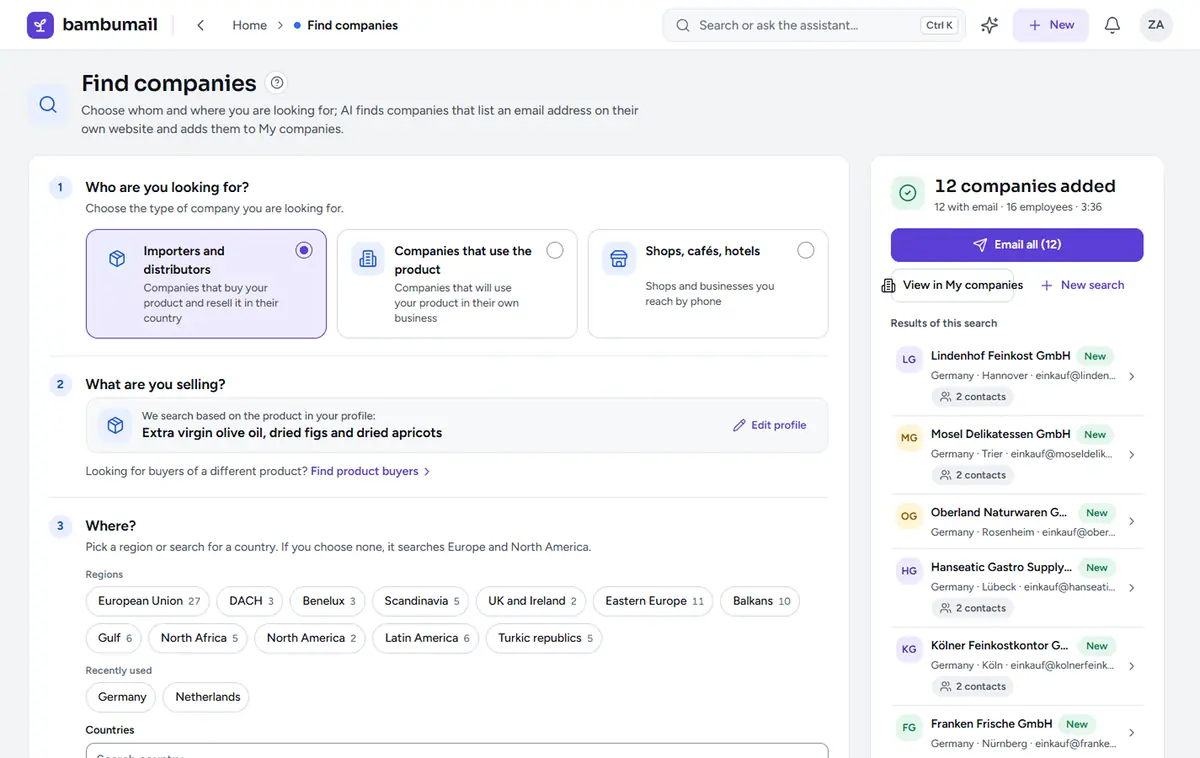
Who will buy my product?
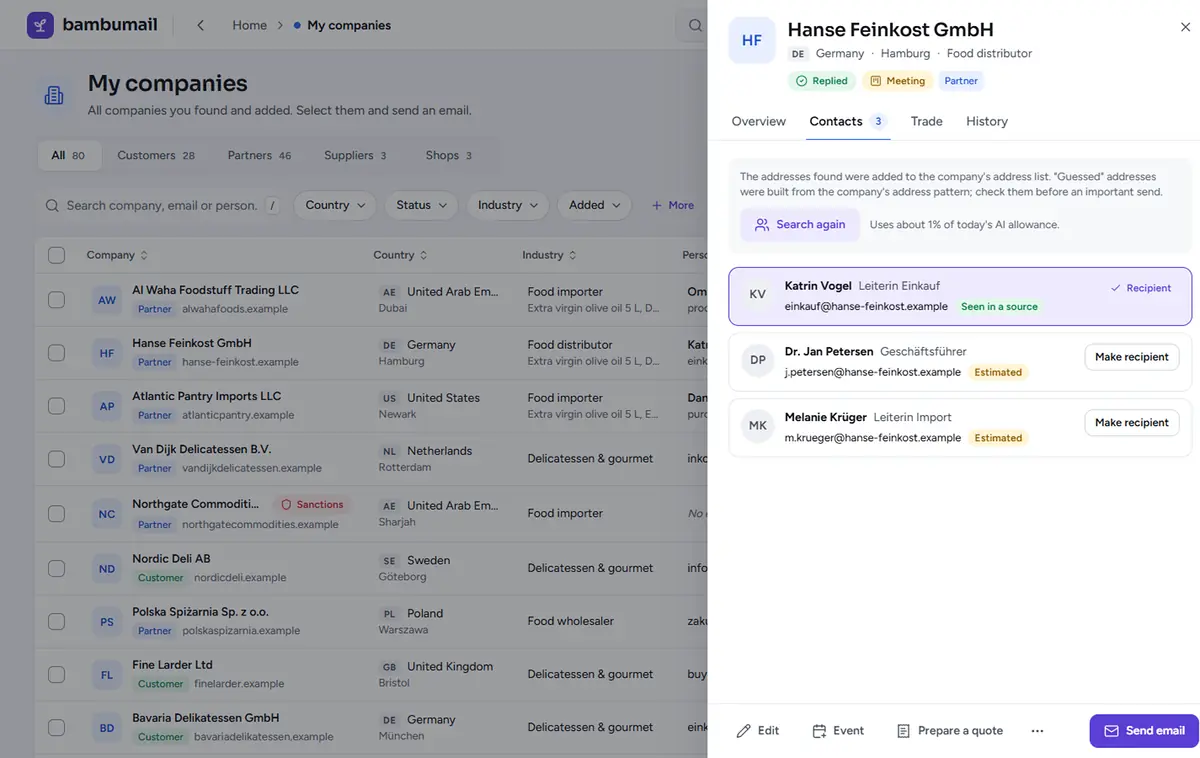
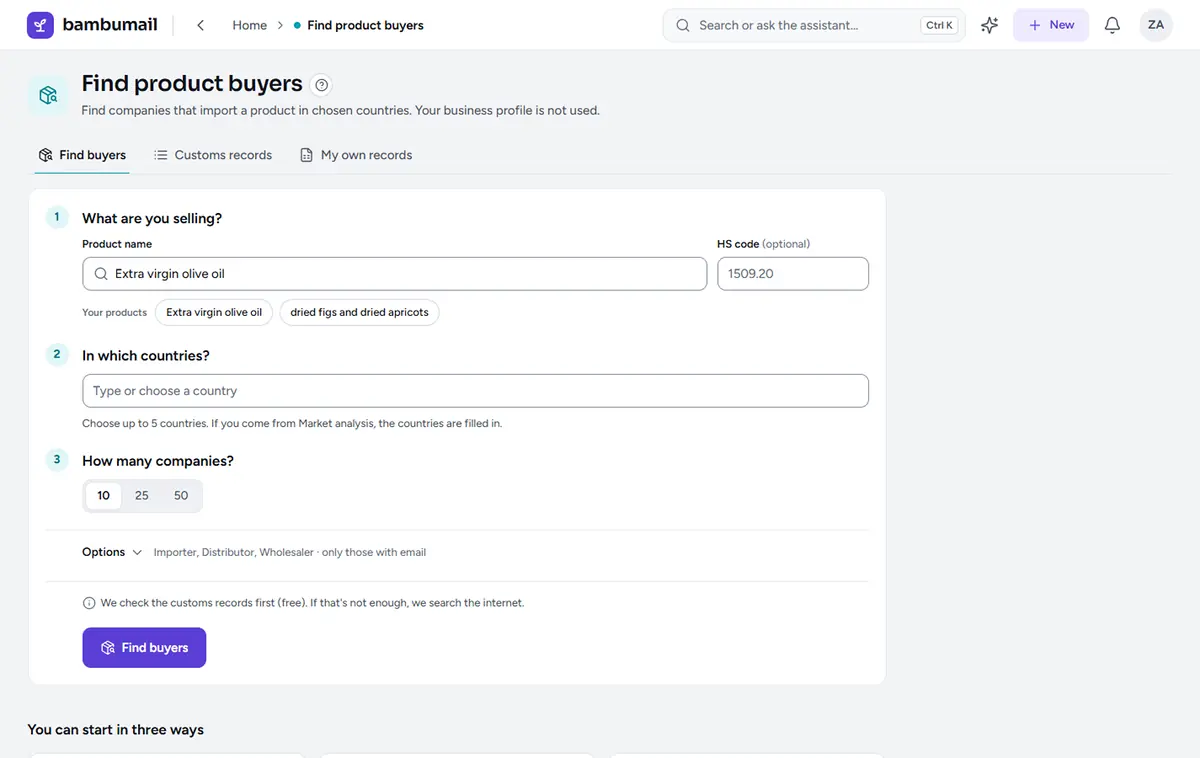
Choose the type of company you are looking for and the region. Matching companies go into your “My companies” list, with any purchasing and export contacts that can be found. You decide who gets an email.
Send email
What goes in the email, and in which language?
A template can be in any of 13 languages. The AI can help with the first draft, and if you wish, the template is translated once into each target language.
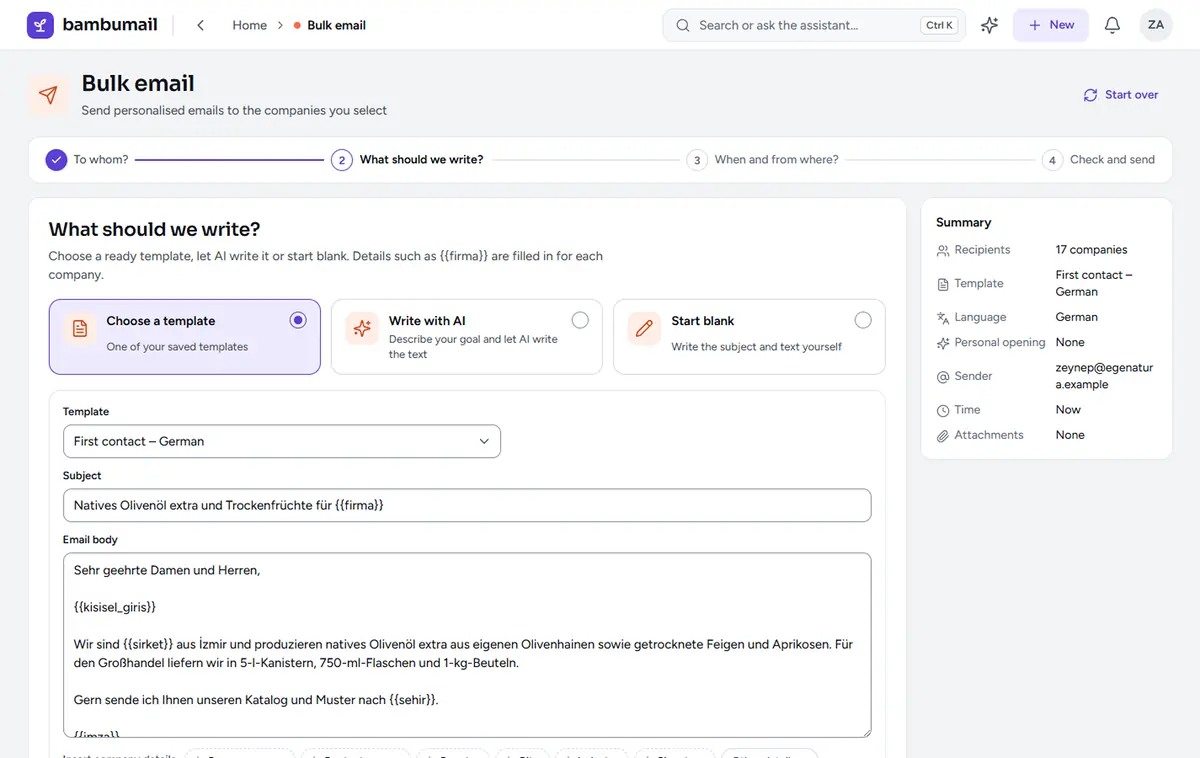
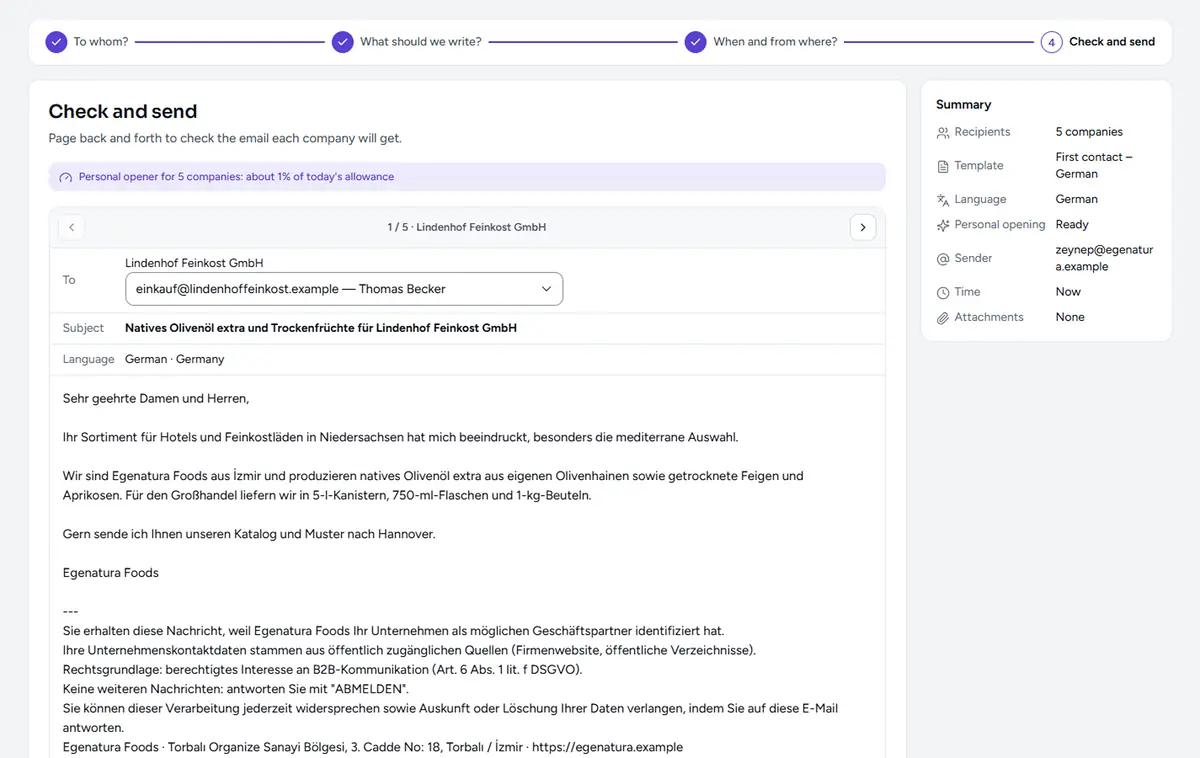
Could it harm our reputation?
A newly connected mailbox warms up slowly: the number of emails it sends rises a little each day. Each email is followed by a short wait. A company that matches a sanctions list gets no email.
11 days
warm-up period for a newly connected mailbox
8–25 s
a wait chosen at random after each email
30 days
period before the same address can get another first emailFootnote 1
4
official sanctions lists; a matching company gets no emailFootnote 2
7
languages for the legal notice and one-click unsubscribe, in every email to the companies you selectFootnote 3
| Recipient’s city | Rule | Sending time |
|---|---|---|
| Houston, USA | Recipient’s time zone, with daylight saving | When office hours start in Houston |
| Riyadh, Saudi Arabia | Friday and Saturday are the weekend | Sunday, in office hours |
| Milan, Italy | Public holidays are skipped | The next working day |
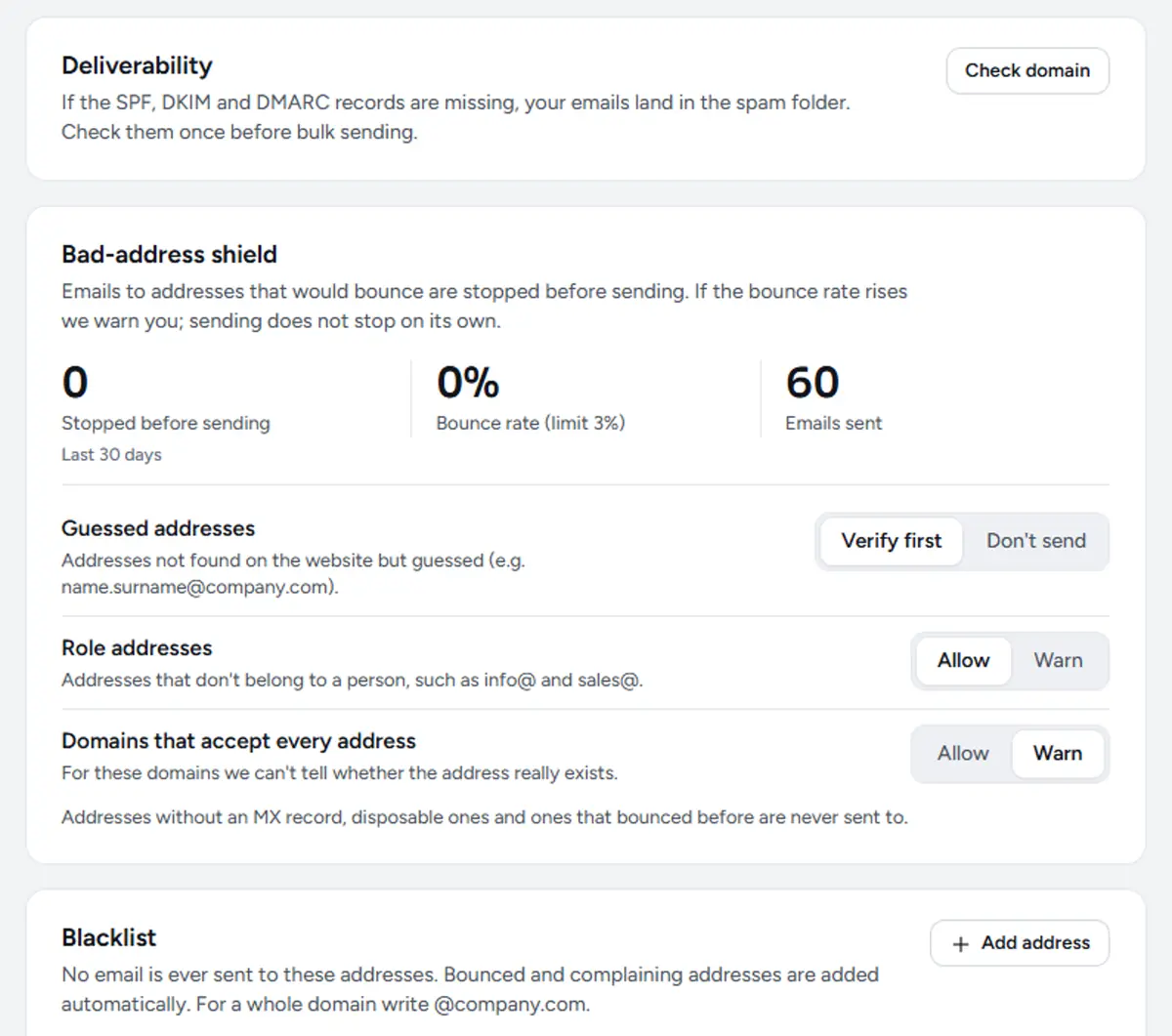
The rules of the country where the recipient is based apply, and they differ: some EU countries, such as Germany, generally require prior consent even for emails to companies.
To be clear
No tool can guarantee inbox delivery, and we make no such promise. As the sender, you carry the legal responsibility; these rules make that work easier.
Replies
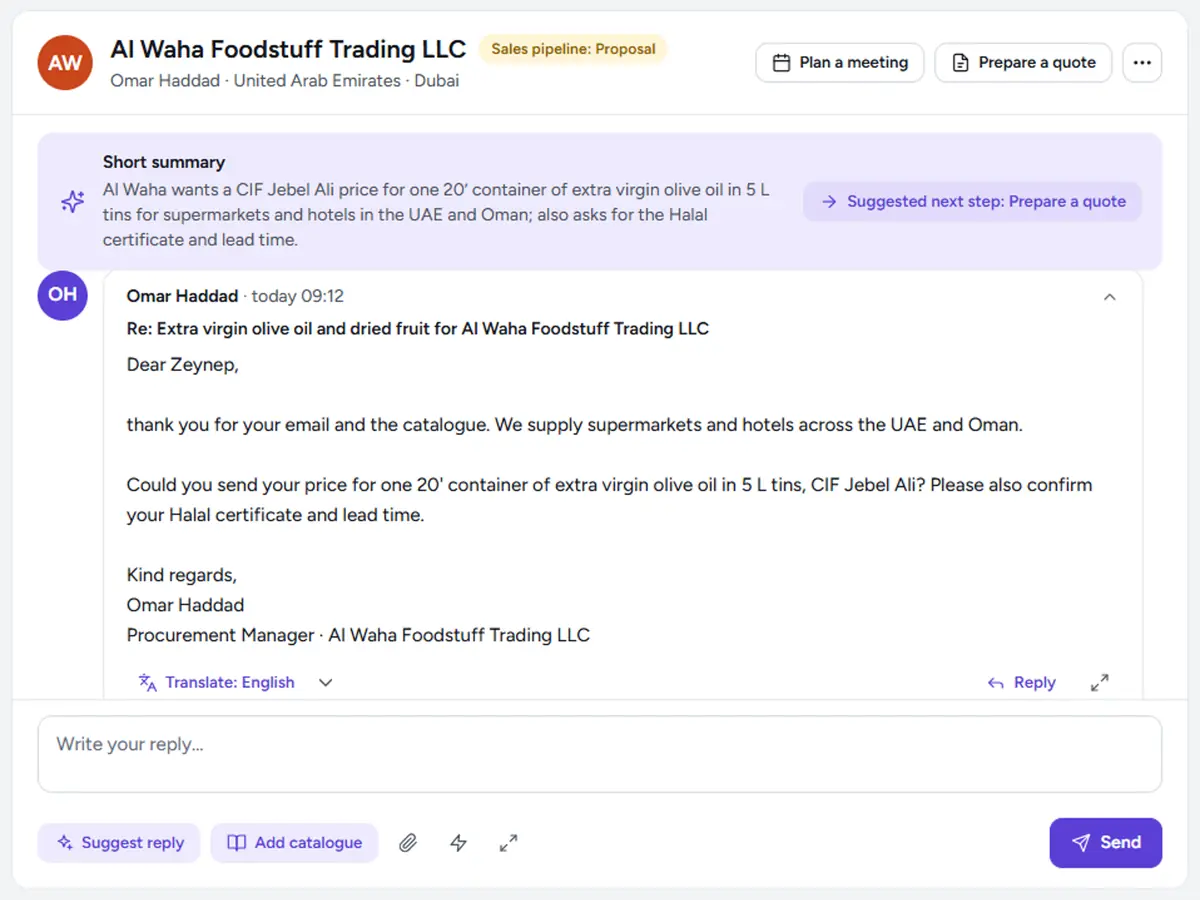
What do I do with a reply?
Each reply is tagged by topic. Use the “Translate: English” button for a reply in another language; when you click “Suggest reply”, a draft is prepared, and it goes nowhere until you send it.
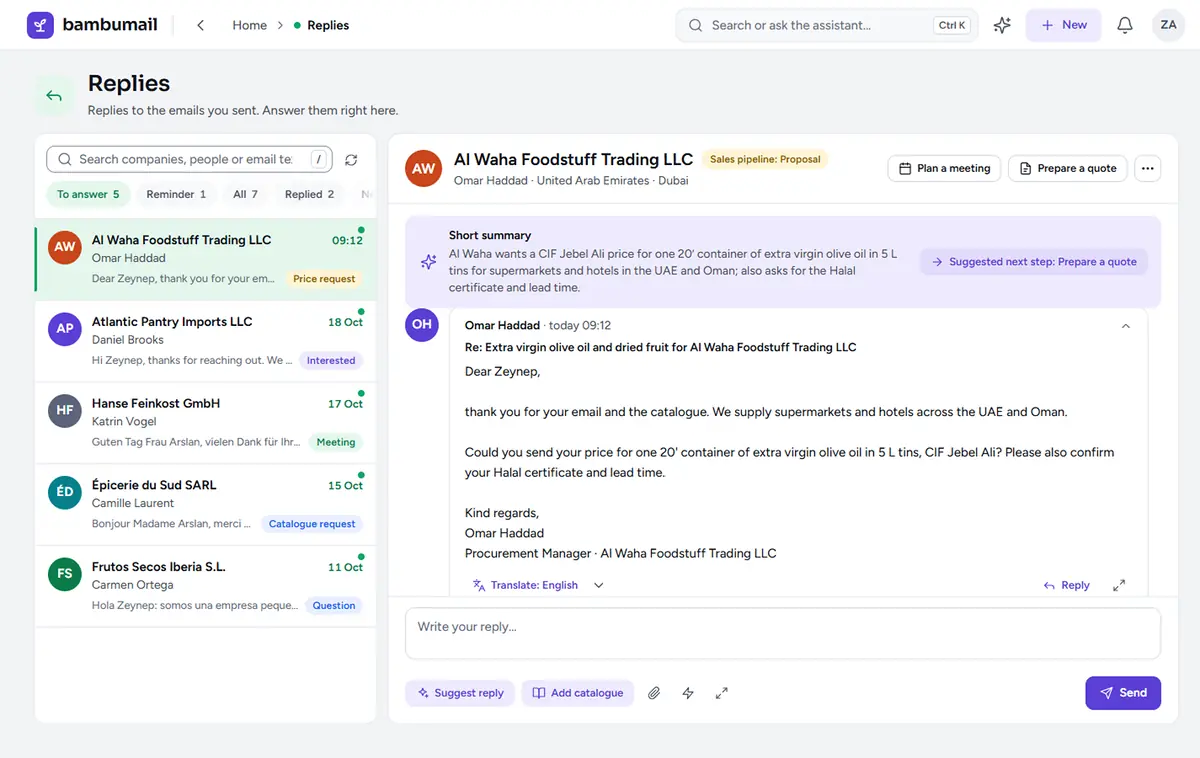
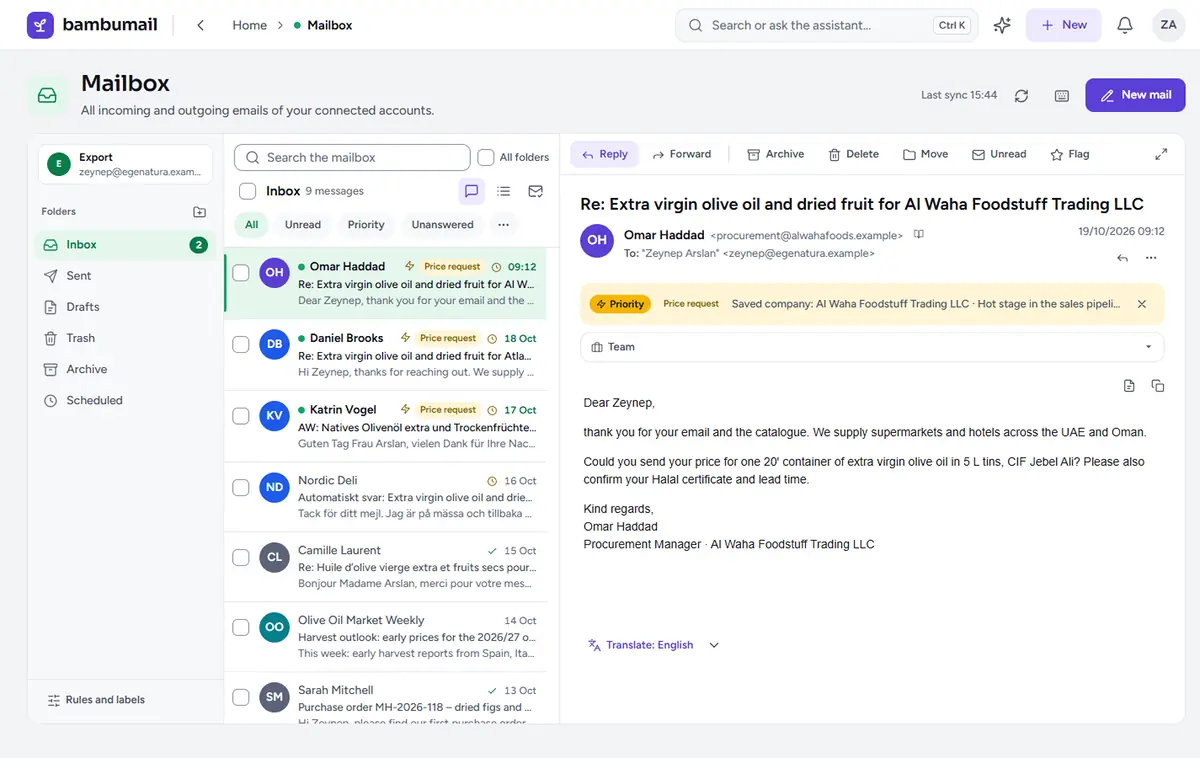
35
translation languagesFootnote 1
25
participants per meeting invitation (max.)Footnote 2
Sales follow-up
Where does the quote stand?
You can prepare the quote and the pro-forma as a PDF and attach them to an email. Replies update the sales pipeline, the board that shows which stage each company is at; only you mark a deal as “Won”. A pro-forma is the preliminary invoice importers ask for.
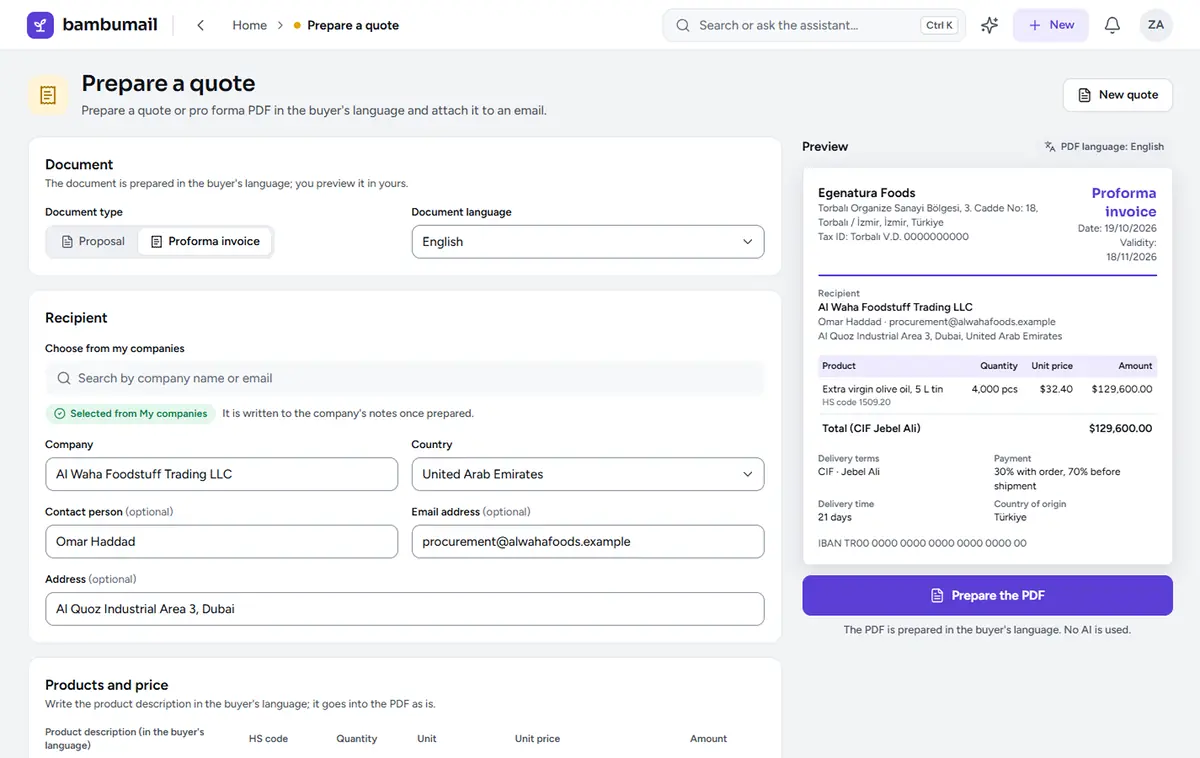
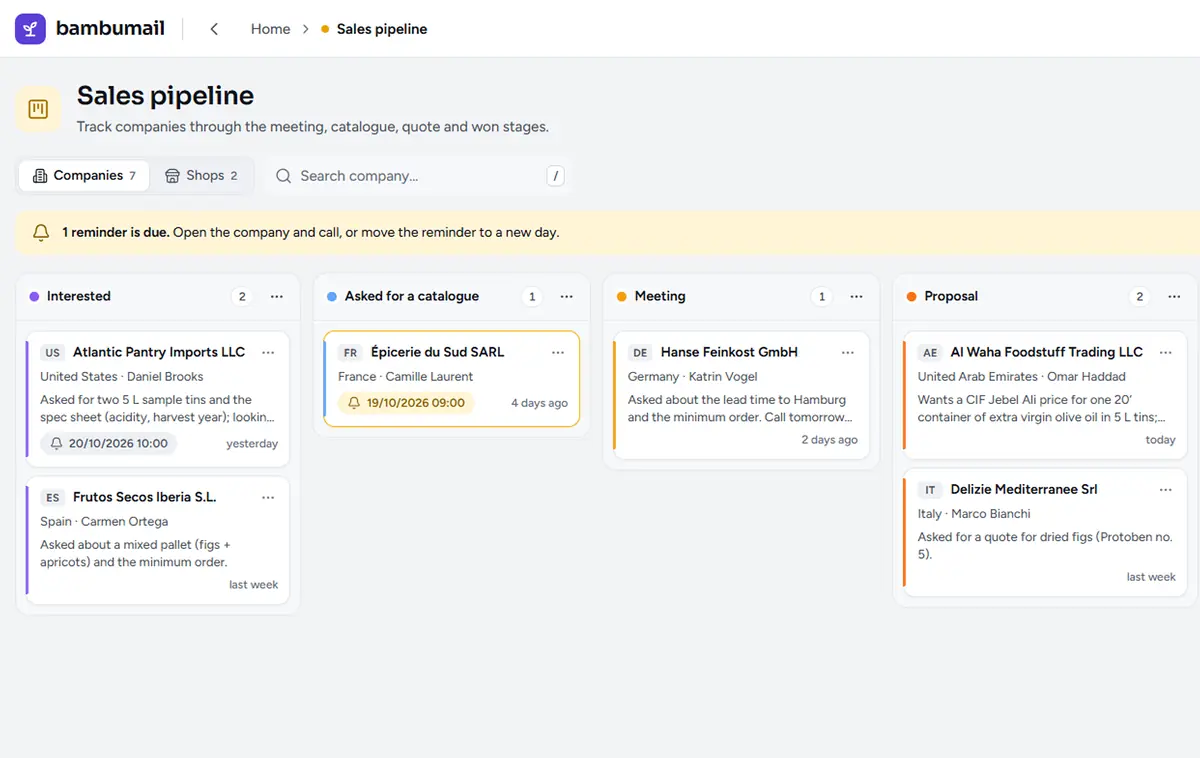
To work with these screens in your own account:
Request a trial accountForeign trade
Which market, which price?
For export market research, the Market analysis tool uses official trade statistics. The Calculate price tool adds customs duty and import VAT to your factory price and converts it at the Central Bank of Türkiye (TCMB) rate, so you see the cost at the buyer’s door. Most of these tools do not use the AI allowance.
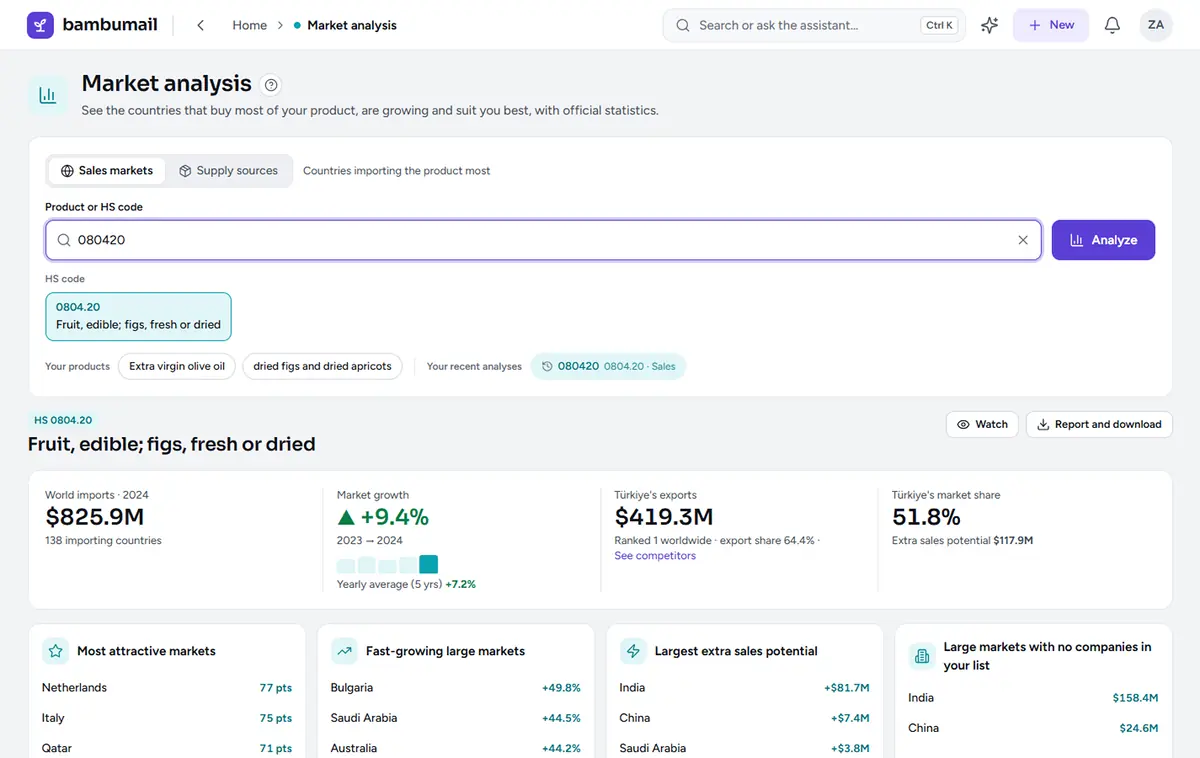
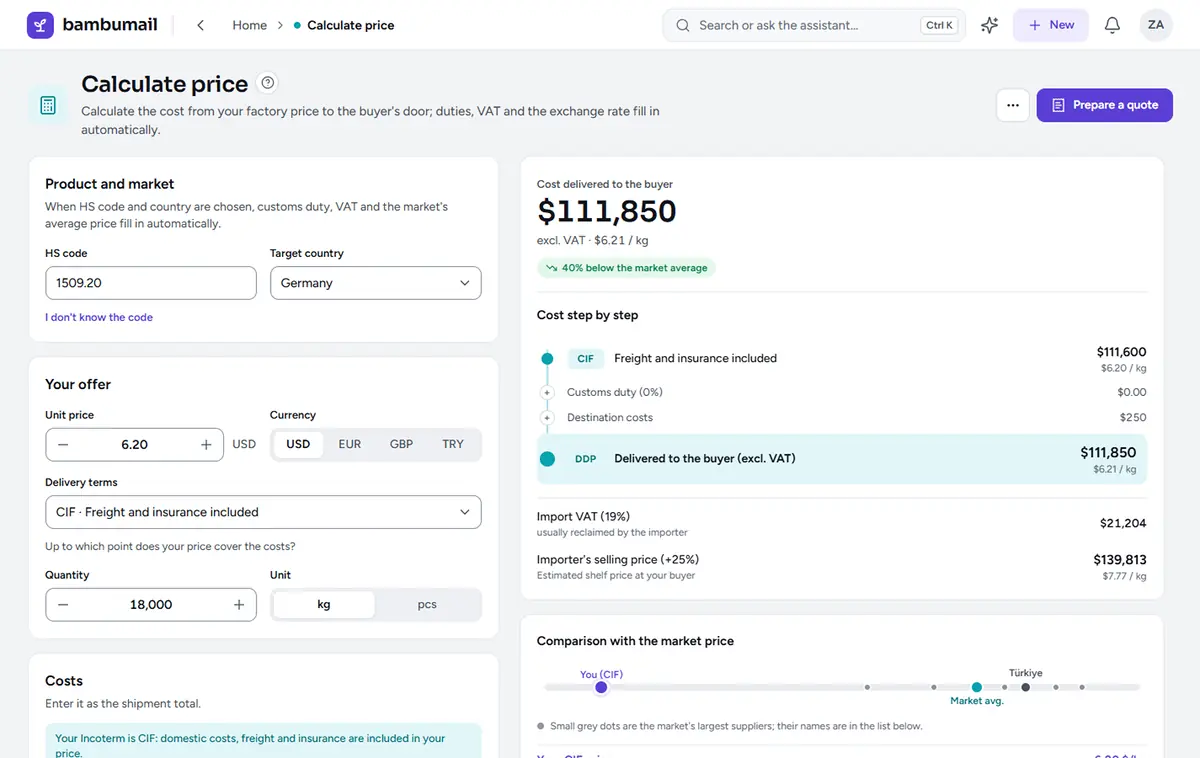
Data sources: UN Comtrade, World Bank WITS, Eurostat, Central Bank of Türkiye (TCMB).
Request a call about market analysisAssistant
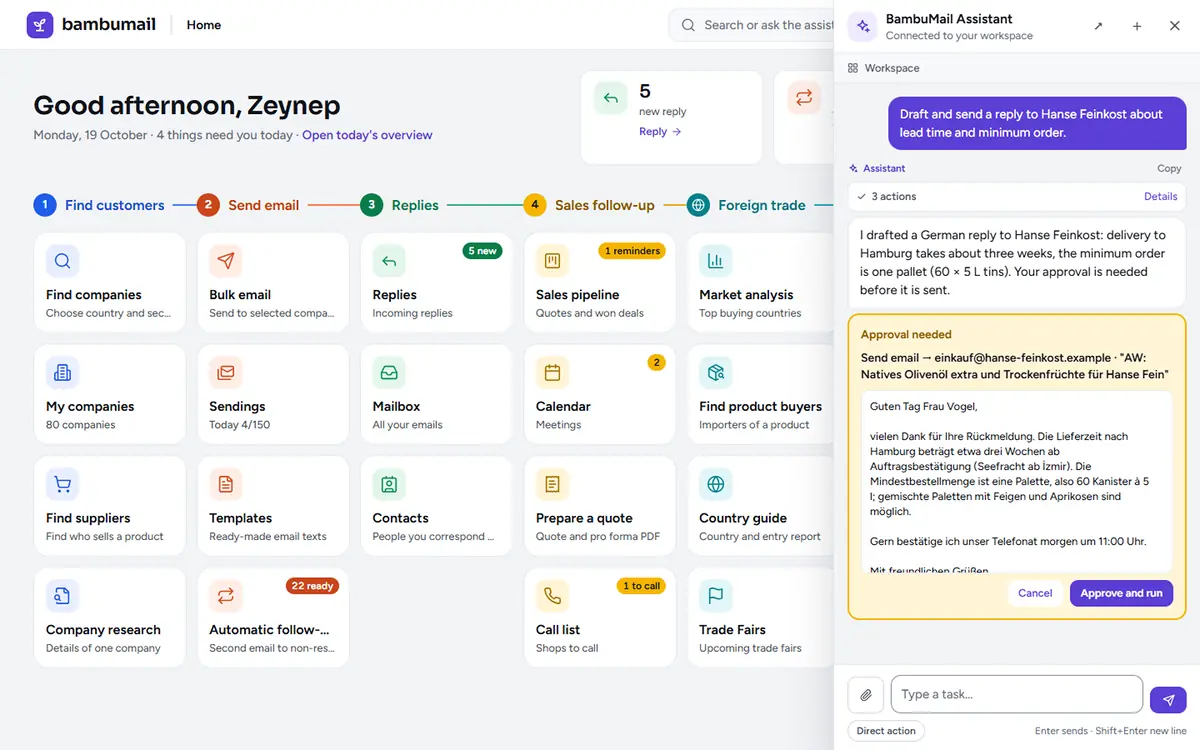
What if the AI gets something wrong?
Your AI allowance is shown as a percentage and is split into daily, weekly and monthly windows. If the allowance runs out, sending, the Mailbox screen, lists and follow-ups keep working.
To be clear
Only you can start a campaign; the assistant does not send even one email without your approval.

Is it right for us?
For businesses that sell their own products, or products they represent, in other countries. It suits an owner who runs exports alone as well as a small foreign trade team.
Manufacturers who run their own exports
Find companiesMarket analysisCalculate price
Foreign trade teams that cover several countries
Team managementRepliesSales pipeline
Trading companies that sell products from several manufacturers
Find product buyersFind suppliers
Manufacturers new to exporting
Country guideFind HS codeEntry report
Anyone who wants to offer an email sending service on behalf of other companies: our Terms of Service do not allow this.
Anyone who wants to send large numbers of emails from one address: BambuMail sends emails one at a time, with pauses in between.
Anyone who wants to reach private consumers: BambuMail is built to find companies and correspond with them.
Is our data safe?
Below: who can see what, and what goes to the AI.

What does it cost?
Every plan includes company search, email sending, replies, quotes and pro-formas, and the Foreign trade tools.
For small teams exporting regularly
All features included
For sales teams in several markets
All features included
For busy export departments
All features included
Unlimited users and mailboxes, fair use
All features included
¹ Fair use applies. In this plan too, AI use comes as a monthly allowance.
| Plan | Pro | Plus | Max | Unlimited |
|---|---|---|---|---|
| Team | ||||
| Users | 5 | 10 | 25 | Unlimited¹ |
| Mailboxes | 3 | 6 | 15 | Unlimited¹ |
| AI (approx. per week; all rows below together, from one allowance) | ||||
| Searches in Find companies | 10 | 17 | 32 | Fair use |
| New companies | 250 | 425 | 800 | Fair use |
| Company research | 10 | 17 | 32 | Fair use |
| Employee searches | 25 | 40 | 80 | Fair use |
| Market reports | 4 | 7 | 13 | Fair use |
| Assistant messages | 100 | 170 | 320 | Fair use |
| Suggested replies | 100 | 170 | 320 | Fair use |
| Company search | ||||
| Find product buyers, companies per search | 50 | 50 | 50 | 50 |
| Saved companies | 25,000 | 60,000 | 150,000 | 500,000 |
| Storage | ||||
| Storage space | 5 GB | 10 GB | 25 GB | 50 GB |
| Price, excl. VAT | ||||
| Yearly | $600 | $1,000 | $1,800 | $3,600 |
Pro
Team
AI (approx. per week; all rows below together, from one allowance)
Company search
Storage
Price, excl. VAT
Plus
Team
AI (approx. per week; all rows below together, from one allowance)
Company search
Storage
Price, excl. VAT
Max
Team
AI (approx. per week; all rows below together, from one allowance)
Company search
Storage
Price, excl. VAT
Unlimited
Team
AI (approx. per week; all rows below together, from one allowance)
Company search
Storage
Price, excl. VAT
¹ Fair use applies. In this plan too, AI use comes as a monthly allowance.
If you need more users or mailboxes than a plan includes, put the number in the request form; we will reply in writing.
How do we start?
Our team opens your account after the phone call. We discuss your plan and payment once you have used the trial account for your own export work.
Name your product and the countries you have in mind; the confirmation email follows at once.
straight awayWe talk about what you make, which countries you want to sell to and how many people will work with it.
within one business dayOur team opens the account. You set your password with the link in the invitation email, then sign in through the browser or the Windows app.
after the callThe app greets you with a four-step setup guide. On the day you connect your mailbox, its warm-up begins.
mailbox: 1–5 minutesTell us which plan you want, with the “I want to switch to this plan” button in the app or by phone. Payment is yearly.
during the trialBambu Games A.Ş. issues the invoice, and you pay by bank transfer or credit card. Your plan becomes active on the day the payment is recorded.
on the day you payTo be clear
The length of the trial is agreed during the phone call. Payment is made after we have agreed on the plan, and nothing is charged without your approval.
Your questions
Add your own question to the request form; we will start the call with it.

No. First, companies that suit your product are found, and you choose who to write to. Emails are personalised with the data in the record and are sent at a human pace, one at a time with pauses in between. Before sending, you can see the final version of each email in the preview.
No tool can rule this out completely; in BambuMail, these rules are on from the start. On a newly connected mailbox, sending rises step by step over 11 days. Addresses are checked before sending; by default, only one estimated address per domain is tried at first. You check your domain on the Deliverability and privacy screen: SPF, DKIM, DMARC, MX. Campaign emails carry a one-click unsubscribe link.
The rules of the country where the recipient is based apply. For example, in Türkiye a first commercial message to merchants and tradespeople needs no prior consent, but once the recipient refuses, no further message may be sent to them. In some EU countries, such as Germany, advertising emails to companies also generally need prior consent. As the sender, you are responsible. The legal notice and one-click unsubscribe make this easier but do not replace consent; this answer is not legal advice.
Companies are found in public sources on the web. In importer and distributor searches, a company is added by default only if an email address is found on its own website. Employee addresses come labelled “Seen in a source” or “Estimated”; an estimated address is added only if the domain accepts email. Customs records are also compiled from public sources. You choose who to write to, after you have seen each company.
You see every company on the list, and you choose who to write to. An AI draft is not saved automatically; you check the text and save it. Before sending, you can see each company’s email in the preview. If the personal opening contains a name, number or city that is not in the record, the sentence is removed. The assistant also asks for your approval before it sends an email, deletes anything or makes bulk changes.
A template can be in any of 13 languages, and the AI can prepare the first draft. If you wish, a template is translated once into each target language. For a reply in another language, the “Translate: English” button gives you an English version; the tool supports 35 languages. “Suggest reply” drafts an answer in the buyer’s language. You can also draft your answer in the language you work in and translate it before sending. Translation and suggested replies use the AI allowance.
The wizard for adding an email account recognises Gmail and Google Workspace (with an app password), Yahoo, iCloud, Yandex, Zoho and Natro Kurumsal E-posta accounts. Other IMAP or POP3 accounts that accept sign-in with a username and password can be added manually, together with their SMTP details. Connecting an account takes 1–5 minutes.
AI providers never see the passwords of the mailboxes you connect; on our server, these passwords are protected with AES-256-GCM. Contracted AI providers receive only the content each task needs. The administrator grants each employee access to selected mailboxes only. For your GDPR and KVKK (Turkish data protection law) processes, there is a data subject request tool and a retention period setting.
Plan prices are in US dollars and are shown excluding VAT. Bambu Games Yazılım Sanayi ve Ticaret A.Ş. issues the invoice.
Our team opens the trial account after the phone call; you set your password with the link in the invitation email. The length of the trial is agreed on that call. When the trial ends, your data is kept. To continue, you choose a plan; payment is made after we have agreed on the plan.
Once we have agreed on the plan, you pay by bank transfer or credit card. Bambu Games Yazılım Sanayi ve Ticaret A.Ş. issues the invoice. Payment is yearly. There is no automatic renewal; a new period starts only with a new payment.
Yes. Your administrator requests the new plan in the app under Settings → Usage and plan, or calls us. The change applies once you have approved it and the payment has been made. Extra AI usage is requested on the same screen.
Our team opens your account after the phone call. When you first open the app, a four-step guide helps you set it up. Connecting a mailbox takes 1–5 minutes. Your colleagues receive an email invitation; the invitation link is valid for 7 days.
Yes, in the browser. BambuMail runs in current browsers, including on a Mac. For Windows 10 and 11 (64-bit) there is an app that updates itself. On a phone, you also use it in the browser. The sending queue runs on the server; closing the app does not stop it.
There is no automatic renewal; if you do not approve a new period, your plan is not extended and nothing is charged. When your subscription ends, we hand your data over on request; after a reasonable period, it is deleted. To have your account deleted, write to info@bambugames.com.tr.
No. Our Terms of Service do not allow BambuMail to be used to provide an email sending service on behalf of other companies. You can use it to sell your own products or the products you represent.
Request
When you submit the form, a confirmation email goes straight to your work address.
Instead of using the form, you can call or write to us.
Please check your inbox. Expect a call from us within one business day.